Level 2 turned one simple rule into a tidy three-move puzzle
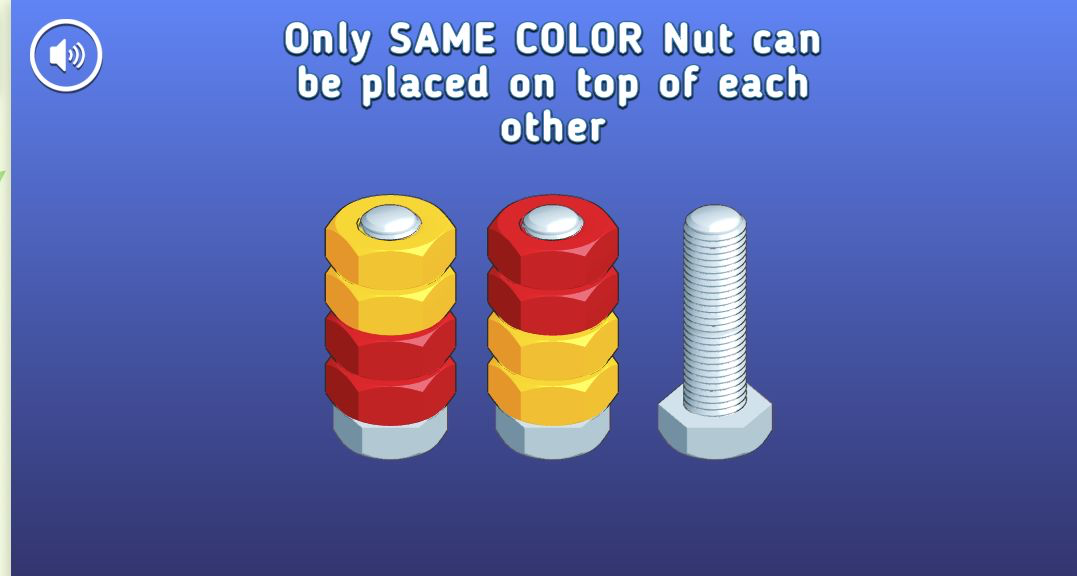
My representative puzzle in Nuts Puzzle: Sort By Color was Level 2, where eight nuts were split across two bolts. The left bolt held two yellow nuts above two red ones, the middle reversed that order, and the third bolt was empty. A message stated that only a nut of the same color could be placed on top of another. There was no move counter or timer pushing me to rush, so the challenge was to identify which color needed the temporary space.
The solution took three grouped moves. I moved the two exposed yellow nuts from the left bolt to the empty one, transferred the two exposed red nuts from the middle onto the red pair at left, then moved the final yellow pair onto the right-hand yellow pair. Level 2 completed immediately. That small sequence explains the game's appeal better than a feature list: expose a buried color, consolidate the newly available match, and close the puzzle with the stack you used as a buffer.

The first level teaches selection and destination separately
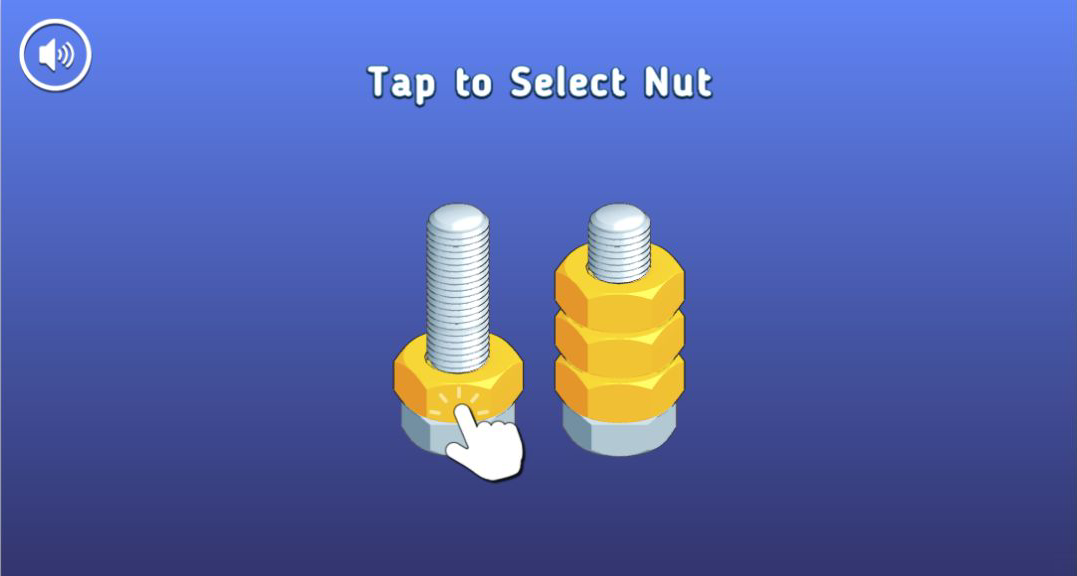
Level 1 is almost entirely instructional, but it teaches the interaction cleanly. One yellow nut sat alone on the left bolt while a matching yellow stack waited on the right. The first prompt said Tap to Select Nut and placed a large hand over the loose piece. After selection, the nut lifted clear of the thread and the prompt changed to Tap to Move Nut, with the hand now indicating the destination stack.
That separation is useful because these puzzles are not drag-and-drop. A click or tap chooses the exposed nut or same-color group; a second input chooses the bolt. The raised piece makes the current selection obvious, and an invalid buried piece is never presented as available. I finished the tutorial with that single transfer. No written explanation of stack depth was necessary, and the large nut shapes made the intended target easy to hit on both mouse and touch.
An empty bolt is working space, not wasted space
The important beginner habit is to stop treating an empty bolt as the final home for a color. In Level 2, the empty thread existed to release the two red nuts buried below yellow. Parking the yellow pair there exposed red on the left and also created a legal place for the remaining yellow pair later. Moving a color merely because it fits can consume that flexibility and leave the buried arrangement unchanged.
The game helps by moving adjacent matching nuts as one group. My first Level 2 input lifted both top yellow nuts together rather than asking for two identical transfers. This keeps the puzzle brisk and makes the board state easier to reason about. Before every move, I would ask two questions: which color will this uncover, and will the destination still accept the next group? On this board, those questions produce the three-move solution without trial and error.

Completing the red stack made the final move obvious
The most satisfying frame arrived after move two. Four red nuts formed a complete column at left, while two yellow nuts remained on each of the other bolts. The mixed layout had become a nearly solved diagram, and the final yellow transfer required no guessing. Strong color contrast matters in a sorting game, and the saturated red and yellow surfaces remained distinct against the blue background even when the board was reduced in the portrait player.
There is very little visual clutter during a puzzle. The sound button stays in the corner, the rule sentence sits above the bolts, and the rest of the screen is reserved for the pieces. The beveled nuts rotate only enough to communicate selection and movement. I never lost track of a group or wondered whether a transfer had registered. The tradeoff is that the first two levels are gentle; I did not play far enough to judge later color counts, spare-bolt pressure, or difficulty progression.

Rewards advanced from 25% to 50%, with an ad between levels
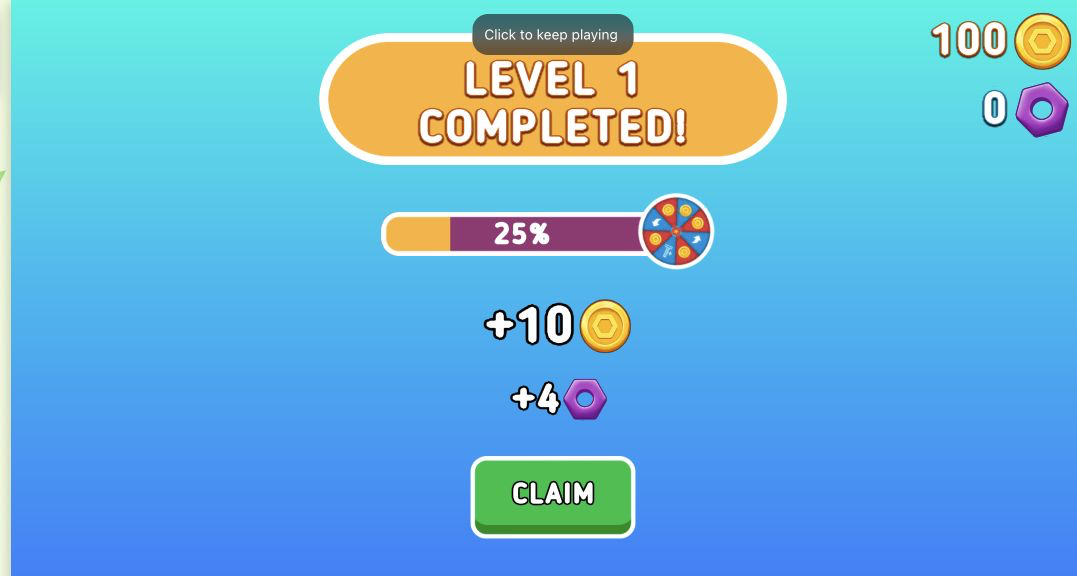
The result screens provide concrete progress rather than only a Next button. Level 1 displayed a 100-coin balance and zero purple nuts, moved the wheel bar to 25 percent, and offered +10 coins and +4 nuts behind Claim. After claiming, Level 2 began with 110 coins and four nuts. Its completion screen advanced the bar to 50 percent and offered another +10 coins plus +8 nuts. I recorded those numbers as displayed and did not infer what happens when the wheel reaches 100 percent.
A skippable Playgama advertisement appeared before the first session, and another interstitial separated the early levels. I waited for the safe Skip or Close Ad control and never clicked an ad creative. The interruptions were short compared with the puzzle, but Level 1 itself is so brief that the first ad feels proportionally large. Players seeking uninterrupted rapid-fire sorting should expect that loading and reward flow, even though no purchase or account was required in my test.
Touch matched the desktop solution, though desktop used the space better
I repeated Level 2 at 390 by 844 by entering through Playflaming's own Play button and verifying the fullscreen modal through its visible back control and bottom title strip. Touch selection reproduced the desktop sequence exactly: yellow to the empty bolt, red onto red, then yellow onto yellow. The same Level 2 Completed screen appeared with 50 percent progress, a 110-coin and four-nut balance, and the +10 and +8 claim values. This was a complete touch loop, not a menu-only check.
Desktop is my slight preference because the three bolts sit closer to eye level and use more of the available width. Portrait mobile leaves a large vertical gap, but the nuts remain large and every target responded reliably in emulation. That supports claims about layout and touch input, not physical-phone battery, heat, or network behavior. For a calm first sorting session, the rules are readable, the grouped moves are efficient, and the reward state is transparent. The main reservation from these two tested levels is ad frequency, not the puzzle controls themselves.
