The first client began with a bead, not a menu
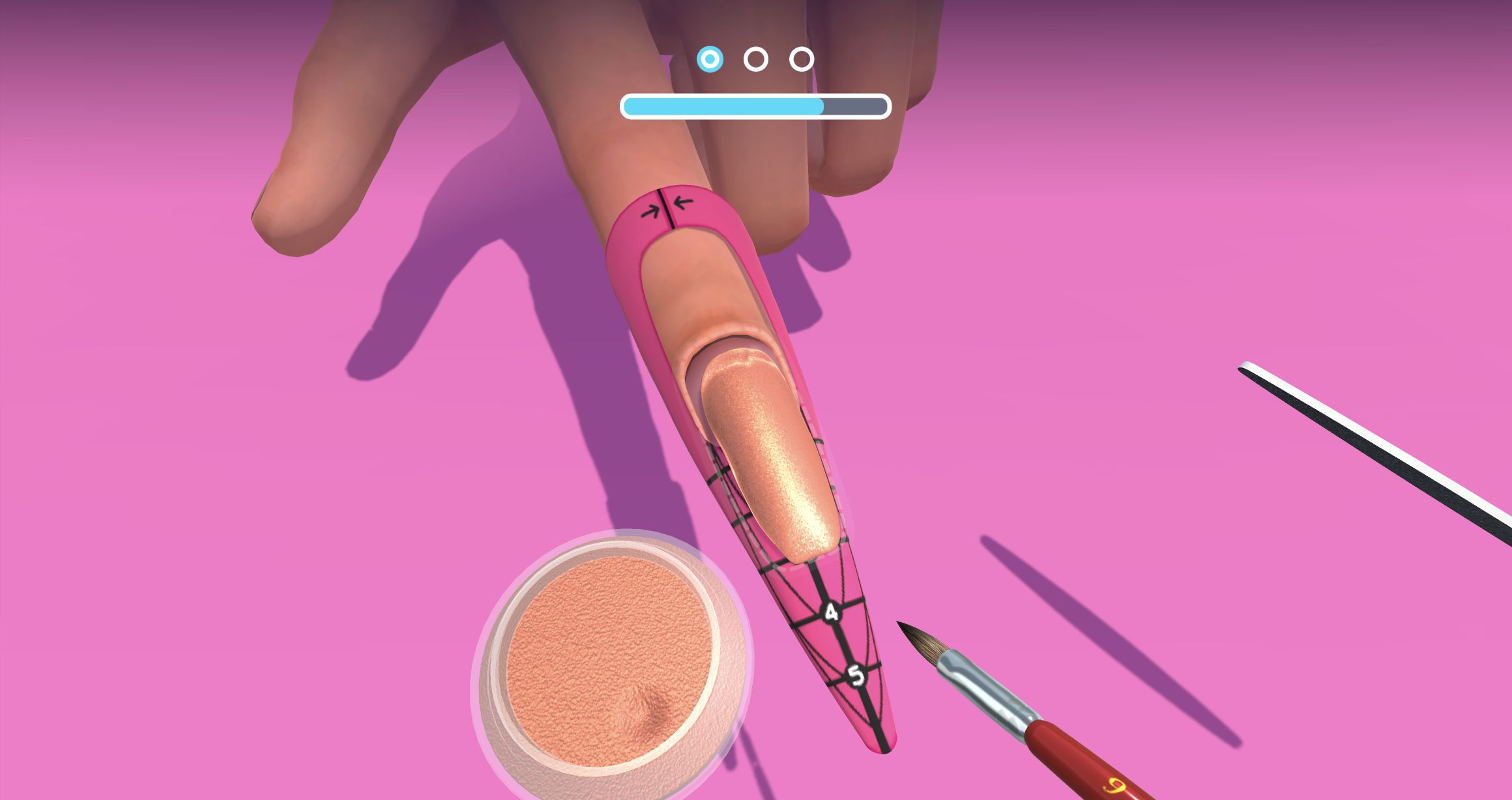
My desktop session did not begin with a salon lobby or a long choice screen. The direct player put a client's finger under the camera immediately, already fitted with a black nail form numbered from 1 to 5. A rose-gold acrylic bead sat near the natural nail, with a powder pot at the lower edge, a brush to the right, three circular stage markers, and an empty progress bar above. It was a useful opening because every object needed for the first job was visible, but it also assumed I would understand how the tools worked.
I first treated the surface like a normal drawing canvas and dragged across the nail. Nothing happened. The real interaction began only when I started a drag on the visible brush tip, carried it through the bead, and pulled toward the numbered free edge. That distinction is the most important early lesson: move the tool itself, not an imaginary cursor. Once the brush engaged, the bead visibly stretched and the progress bar moved. The close 3D view made the material change easy to read even though the hitbox was not explained in words.

Long strokes built a convincing extension
The acrylic application was the longest and most tactile part of the client. Broad passes from the cuticle area toward the tip worked far better than short scribbles. The bead changed from a raised lump into a glossy extension, gradually covering more of the guide. When I kept retracing the same center line, progress slowed near completion; a wider zig-zag across the remaining surface finally filled the last sliver. That small struggle felt honest rather than catastrophic, but it exposed how little feedback the game gives about exactly which patch is still unfinished.
There was no timer, penalty counter, or visible way to ruin the client during this stage. My missed strokes simply produced no result. That keeps the salon accessible, yet the lack of a clear dry-area highlight can make the final few percent feel more fiddly than creative. The satisfying part is visual: the extension lengthens in real time, its rose-gold shimmer catches the light, and the numbered form gives a strong sense that material is being built beyond the fingertip rather than merely colored on top.
Filing rewarded patience more than precision
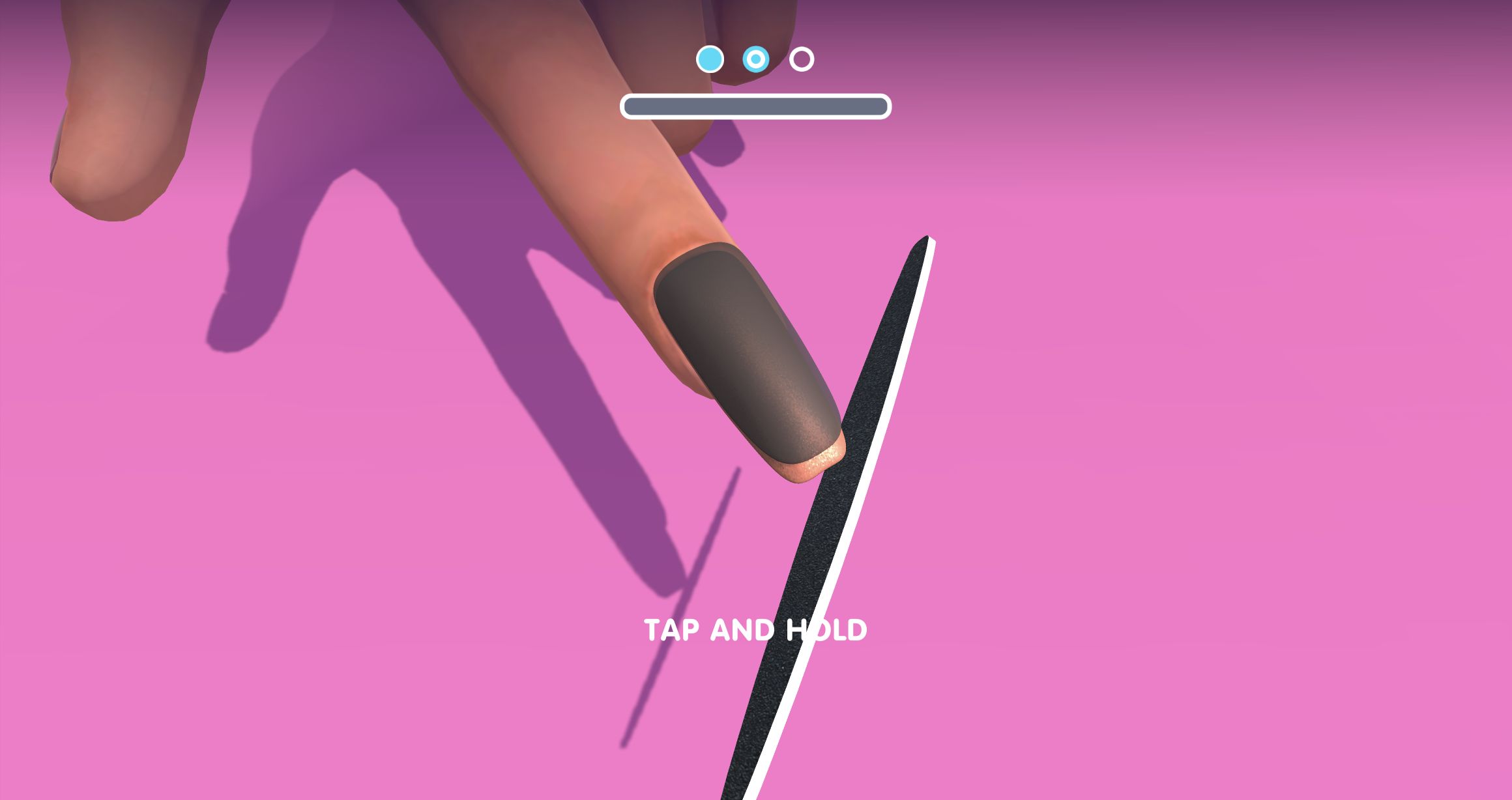
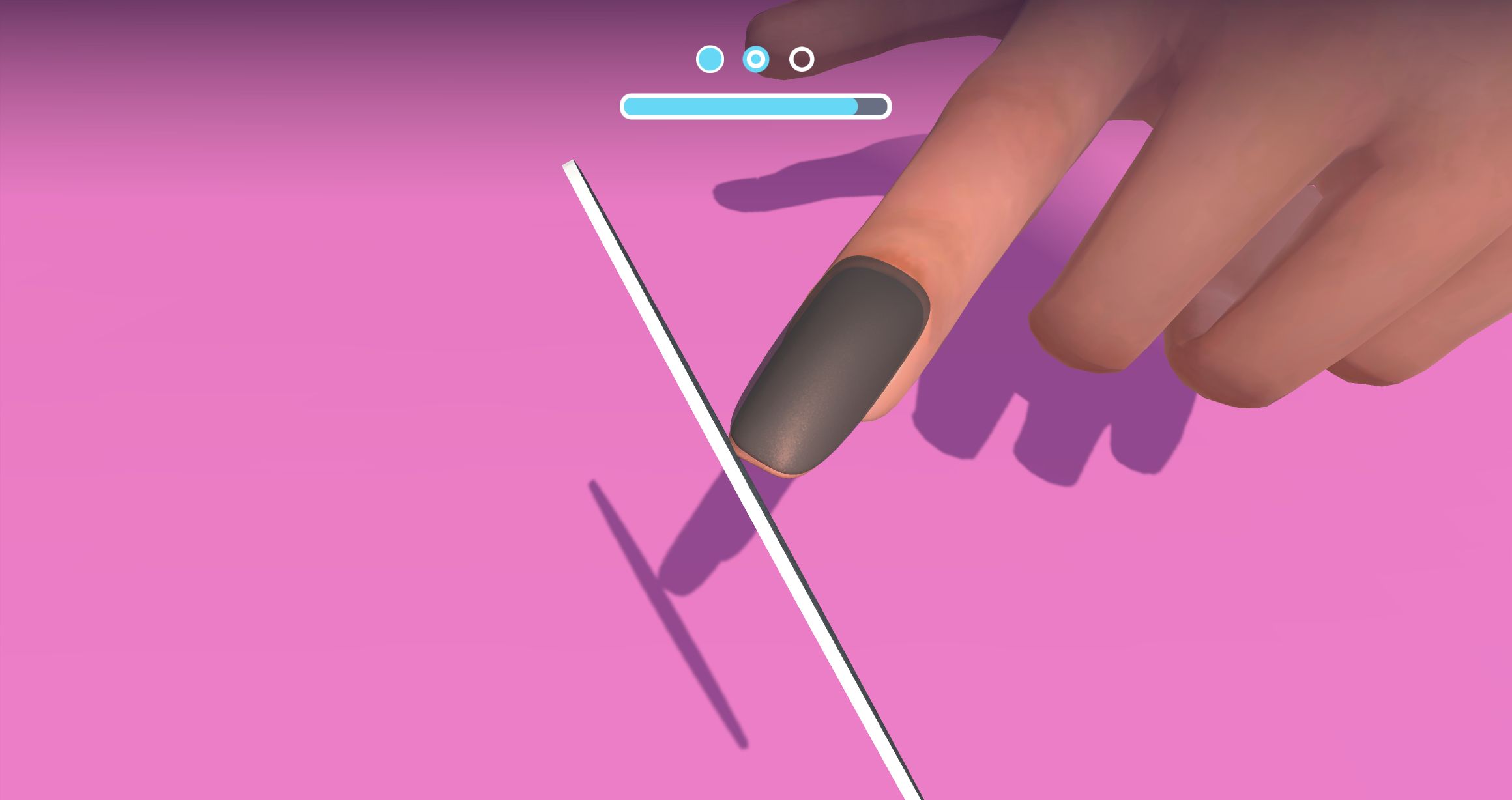
Completing the acrylic bar removed the form and moved the active marker to stage two. The game displayed TAP AND HOLD beside an oversized file, and this instruction was more reliable than the first tutorial. A held drag against the tip advanced roughly a tenth of the bar, so I repeated that sustained contact rather than trying to trace every edge manually. The camera rotated between side and oblique angles while a dark shaping overlay covered the nail, giving the process a little motion without changing the basic input.
Filing therefore felt less expressive but also less ambiguous. I did not encounter a failure state, crooked-nail warning, or quality penalty. The bar was the only judge, and steady contact completed it. Players looking for exact salon technique may find that simplified, while anyone who enjoys low-pressure makeover games will probably appreciate that the stage cannot easily be spoiled by one clumsy movement.
The color tray offered a genuine style decision
Stage three opened the first real style choice. The horizontal tray included black, royal blue, green, red, pale gradient, purple gradient, yellow, brown, orange, white, pink, and multicolor bottles. I chose royal blue because it contrasted strongly with the warm acrylic base and would make the later decoration easy to judge. The range was wide enough to feel like a choice rather than a disguised tutorial answer, and no option in the visible row carried a price or lock icon.
Applying the polish repeated the tool-hitbox lesson. Swiping in the empty tutorial lane moved the huge bottle and brush but did not coat the nail. Starting on the visible blue brush tip and pulling directly down the surface covered about half; a second deliberate stroke finished the coat. The royal-blue result was smooth with a faint speckled texture. The oversized tool temporarily blocked part of the view, so watching the progress bar was more dependable than trying to inspect every edge mid-stroke.

Sun charms turned one choice into a full set
The accessory tray was more varied than the color tray. I could see a black bow, dangling crystals, a gold cross, a purple flower, a sun, a red-gem vine, a spider, a crescent moon, linked stones, a crystal cluster, a heart, and a green gem. I selected the sun motif. A guide then showed several different-sized suns travelling toward the nail, and one drag along that line applied the pattern across the entire hand.
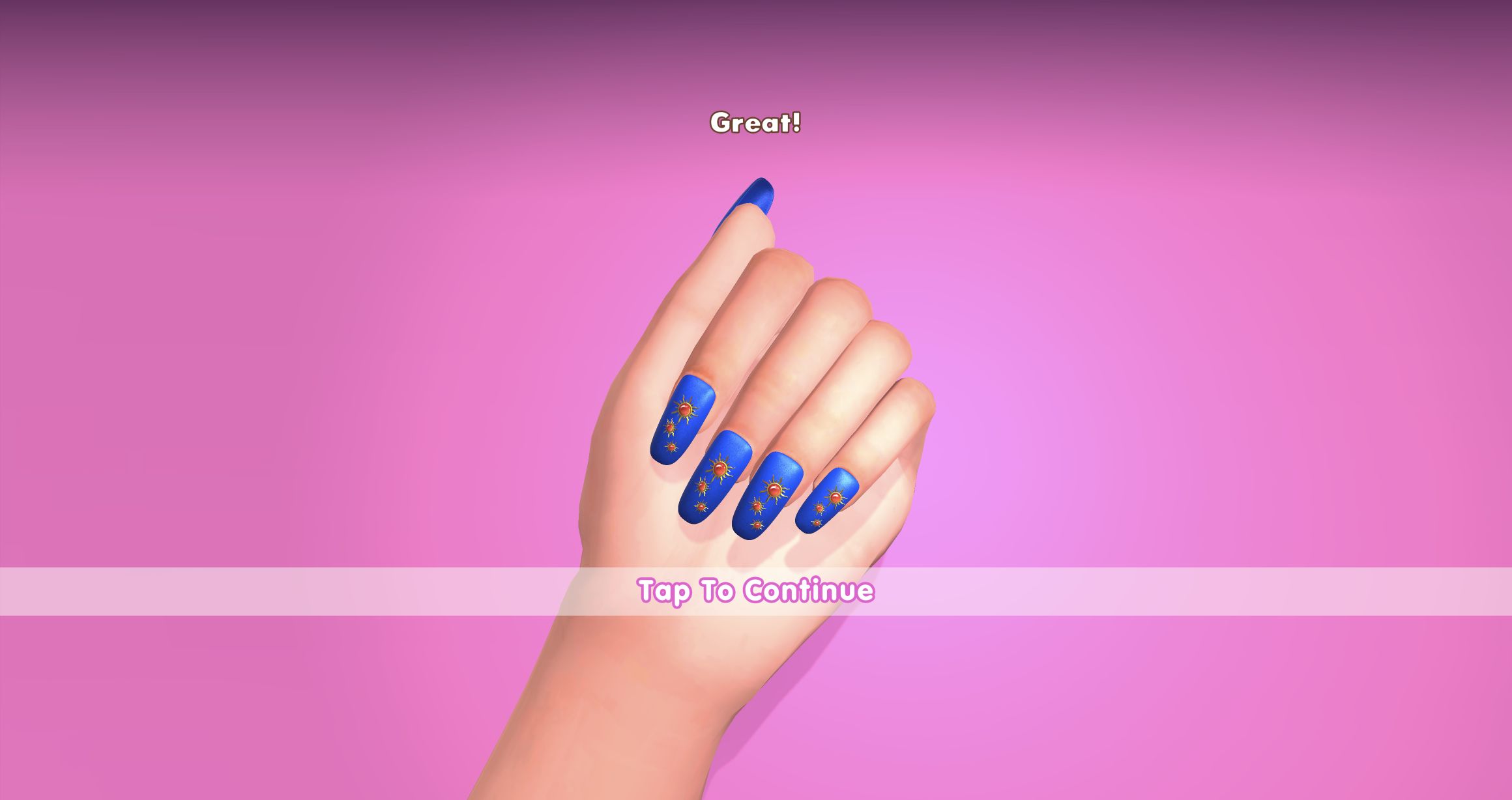
That automatic full-set application produced a coherent result quickly, although it also removed the option to place each charm by hand during this opening client. The final five nails were long royal blue with small orange-red suns arranged in slightly different clusters. The set looked intentional and readable at the result zoom, which made the brief decoration step feel like a payoff rather than another progress-bar chore.
The 390 by 844 fullscreen run exposed the same tray as a horizontal carousel. I kept the royal-blue polish but scrolled to and selected a blue-and-gold ice-cream-cone-shaped charm instead of the desktop sun. One drag again decorated all five nails. That mobile variation confirmed the choice was real, while also showing that a narrow view reveals fewer accessory options at once.

My real result was Great, three stars, and an ad choice
The finished hand first received a Great message with Tap To Continue. The following GOOD JOB! panel showed three gold stars, a heart-like score of 3236, a 150-coin reward, and a nail progress meter at 50%. The wallet still displayed 0 in my captured frame, so I cannot say the coins had already been credited at that instant. This was a complete first-client result rather than a promotional mock-up or a menu-only test.
The result panel's prominent action was CLAIM X2 with a video icon. I left it untouched. Earlier, the Playflaming embed had also shown a skippable third-party preroll before play; I used the Skip/Close control and did not click the advertisement. I saw no purchase checkout, login requirement, chat, username, leaderboard, or multiplayer interaction during the client. The optional reward video is still meaningful friction, especially because the non-video continuation was not prominent on that reward frame.
The separate mobile result was equally complete: Flawless appeared before a three-star GOOD JOB panel with 3474, the same 150-coin reward, and 50% progress. Its wallet also still read 0, and I again left CLAIM X2 untouched. The score difference belongs to the two actual sessions; it is not evidence that one device scores more generously.

Who will enjoy this salon, and what to know first
3D Acrylic Nail: Nail Art Game suits players who like transformation loops more than score pressure. The first client moved through visibly different jobs—building length, filing, choosing color, painting, and decorating—and ended with a clear rating and reward. Its strongest feature is the close-up material response: the bead stretches, the camera moves for filing, and the flat blue coat becomes a coordinated decorated set. The weak point is interaction communication. If a stroke does nothing, return to the visible tip of the brush or file and begin the drag there; do not keep rubbing the nail with the cursor alone.
I completed comparable first-client loops on a wide Chrome desktop player and inside Playflaming's 390 by 844 fullscreen mobile dialog. Both accepted the same drag-and-hold techniques, but desktop is the easier view for this client: its wider canvas leaves more room around the oversized brush and exposes more tray choices before scrolling. Mobile remained responsive and fully playable, though the narrow carousel and tool obstruction added friction. This comparison covers Chrome layout and input only, not real-phone speed, battery use, or thermals. If that relaxed, forgiving rhythm sounds appealing—and an optional rewarded-video prompt at the end is acceptable—the first salon client delivers a satisfying before-and-after result.